Salesforce Commerce
Split Shipping
Designing checkout for the reality of complex carts - physical goods, digital products, subscriptions, and multiple shipping addresses, all in a single transaction.
What was this project?
Split Shipping is a checkout capability built for Salesforce Commerce that lets shoppers fulfill a single cart across multiple shipping addresses. Whether someone is buying gifts for different people, shipping to multiple office locations, or mixing physical goods with digital downloads and subscriptions, the experience handles it - without forcing them to place separate orders.
This was a B2B-driven requirement that had broad B2C implications. Merchants needed a way to unlock multi-address checkout within the Commerce Storefront platform, and the design had to hold up across genuinely complex cart states: physical items with different shipping profiles, digital products delivered by email, and recurring subscriptions - sometimes all in the same order.
What needed to change?
The existing Commerce checkout assumed every item in a cart goes to one address. That assumption breaks the moment someone's cart gets complicated - and carts get complicated all the time.
A shopper might add a physical snack bar, a party pack, a digital nutrition book, and a monthly coaching app subscription in a single session. The old checkout had no model for this. Physical items with different shipping profiles couldn't be routed separately. Digital goods had no dedicated fulfillment path. And if a shopper wanted to send items to two different addresses, they had to place two orders - or abandon and call support.
The design challenge was threefold: give shoppers explicit control when they want it, let the system handle complexity automatically when they don't, and communicate what's happening clearly at every step so nothing feels surprising at confirmation.
What the platform couldn't do - yet
The design had to be honest about what was technically possible in this release. Several edge cases - mixed carts with digital goods, dynamic shipping rate calculation, backwards navigation state - required platform-level changes that weren't scoped. Understanding these limits early meant I could design around them deliberately rather than discovering them at handoff.
- Digital orders and subscriptions were out of scope for this release. The platform couldn't differentiate physical from digital items at the cart level - the checkout had no mechanism to route email-only fulfillment. Mixed carts hit a wall.
- Shipping dropdown wasn't built for digital SKUs. The address selector component had no model for "deliver to email" - adding that would have required significant eng work beyond what was scoped. Deferred to the next release.
- Shipping rate calculation is indeterminate. Rates require a batch auto-save before they can be fetched, which means the checkout enters a calculating state with unknown load time. The UX had to communicate a wait state without triggering abandonment.
- Shipment numbering must stay in sync. When a shopper deletes an item from the split shipment page, the shipment number in the dropdown and the count in the cart header both need to update in lockstep - a coordination requirement that added eng surface area.
- Backwards navigation requires a clean reset. Going back from the split shipment page had to gracefully resolve any partial state - half-assigned shipments, pending address edits - without leaving orphaned data in the cart.
One of the most important scoping conversations was around digital orders. The right answer was clear - digital products should automatically separate from physical items and route to the shopper's email. But getting there required platform-level changes that weren't available in this release.
Error toast + return to cart
When a mixed cart (physical + digital/subscription) enters the split-ship flow, the checkout surfaces an error toast with a link back to cart. Shoppers remove digital items and continue. A workaround - but it shipped and unblocked merchants from the feature entirely.
Native digital order support
Digital items automatically separate into their own fulfillment group - no shipping method, delivered to email. Subscriptions get their own billing cycle card alongside physical shipments. The checkout is self-explanatory without manual removal or special handling.
How I approached it
The first thing I had to nail down was the mental model. There are actually three distinct fulfillment paths that a split order can take - and conflating them in the UI would create confusion fast.
Manual split: the shopper explicitly assigns each item to a shipment and address. Autosplit: the system automatically groups items based on their shipping profiles, product types, or merchant-defined rules - shoppers see the result, not the logic. Digital order: non-physical products like ebooks and subscriptions route to the shopper's email independently, with no shipping method selection needed.
One of the harder calls was what to show (and hide) in the checkout summary when autosplit is active. Showing every item under every shipment made the page feel chaotic. We landed on collapsing the cart item summary when autosplit handles the logic - surfacing just the shipment groups and subtotals instead. Shoppers can expand if they want the detail, but the default view is clean.
Another decision: where to surface the "why" behind the split. Early explorations buried the explanation deep in the shipping method step. User feedback made clear that shoppers needed to understand the split before they started selecting shipping options - so we moved the notification to the top of the Shipping Method section, scoped and prominent, without feeling alarming.
- Digital orders and subscriptions were out of scope for this release. The platform couldn't differentiate physical from digital items at the cart level - the checkout had no mechanism to route email-only fulfillment. Mixed carts hit a wall.
- Shipping dropdown wasn't built for digital SKUs. The address selector component had no model for "deliver to email" - adding that would have required significant eng work beyond what was scoped. Deferred to the next release.
- Shipping rate calculation is indeterminate. Rates require a batch auto-save before they can be fetched, which means the checkout enters a calculating state with unknown load time. The UX had to communicate a wait state without triggering abandonment.
- Shipment numbering must stay in sync. When a shopper deletes an item from the split shipment page, the shipment number in the dropdown and the count in the cart header both need to update in lockstep - a coordination requirement that added eng surface area.
- Backwards navigation requires a clean reset. Going back from the split shipment page had to gracefully resolve any partial state - half-assigned shipments, pending address edits - without leaving orphaned data in the cart.
One of the most important scoping conversations was around digital orders. The right answer was clear - digital products should automatically separate from physical items and route to the shopper's email. But getting there required platform-level changes that weren't available in 254.
Error toast + return to cart
When a mixed cart (physical + digital/subscription) enters the split-ship flow, the checkout surfaces an error toast with a link back to cart. Shoppers remove digital items and continue. A workaround - but it shipped and unblocked merchants from the feature entirely.
Native digital order support
Digital items automatically separate into their own fulfillment group - no shipping method, delivered to email. Subscriptions get their own billing cycle card alongside physical shipments. The checkout is self-explanatory without manual removal or special handling.
What shipped
The solution spans three screens: the split shipment assignment page, the autosplit checkout, and the order confirmation.
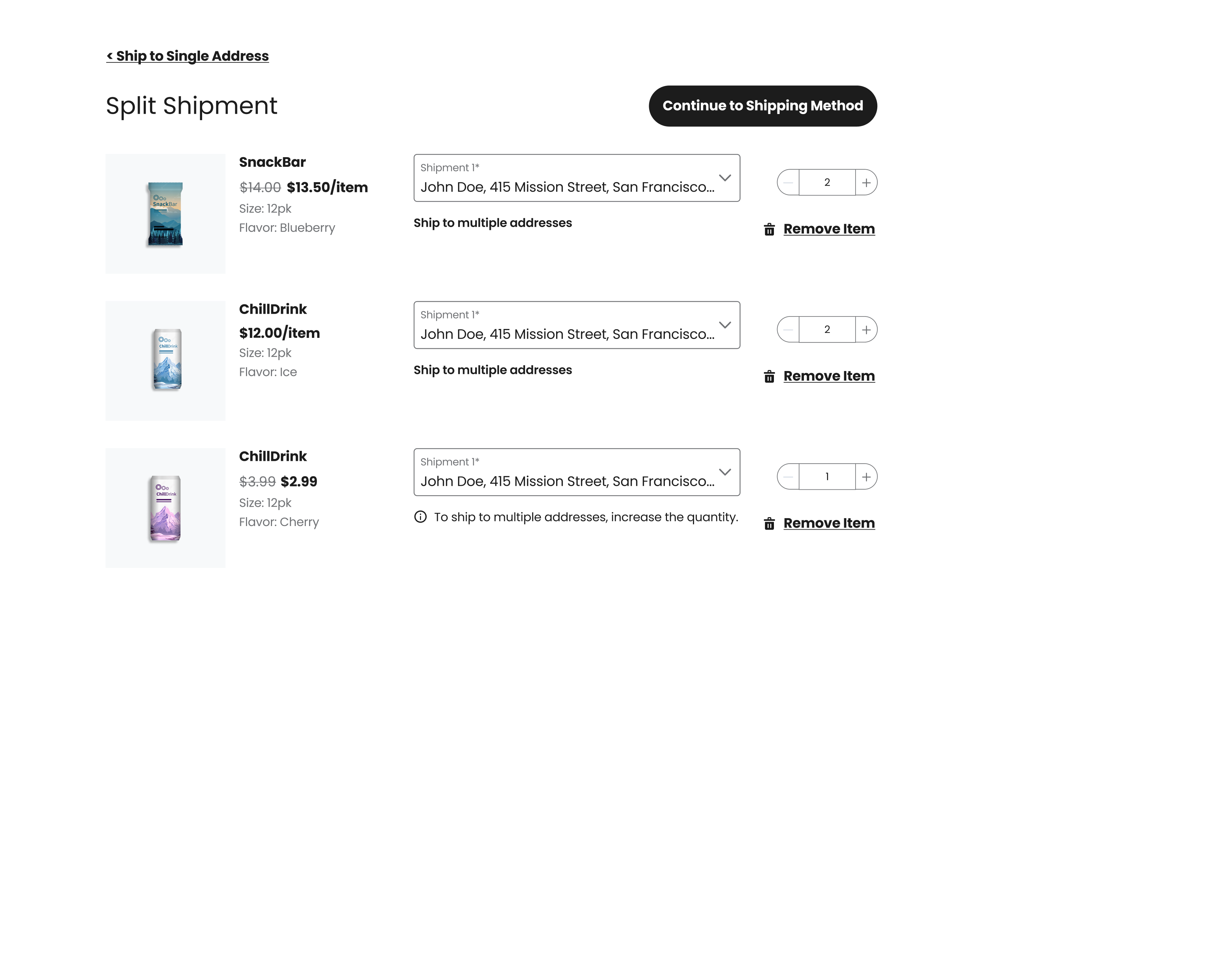
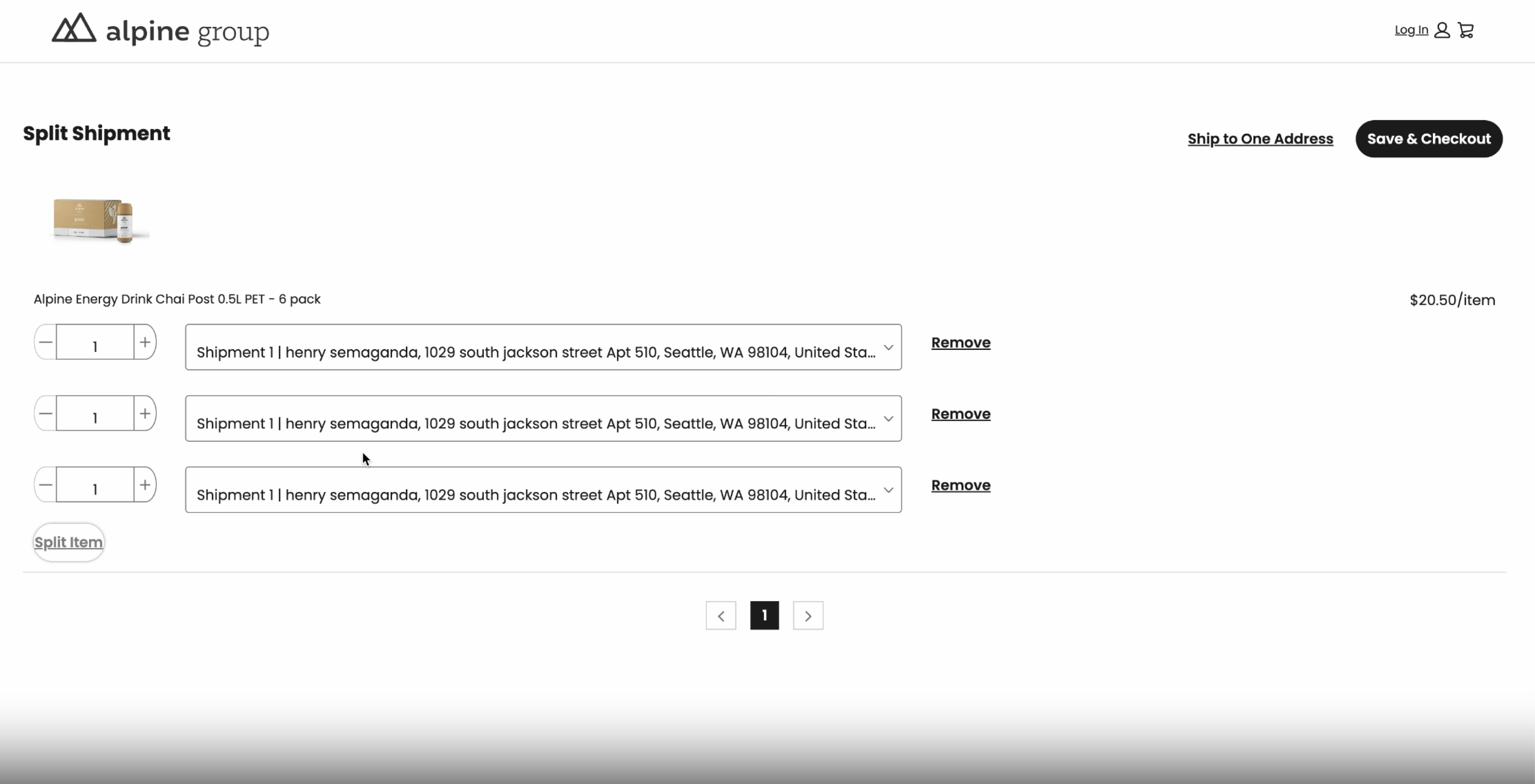
Split Shipment page. After cart, shoppers who want to send items to multiple addresses land here. Each cart item gets a dropdown showing its assigned shipment and the destination address. An inline hint - "To ship to multiple addresses, increase the quantity" - handles the edge case where someone wants to split a quantity-one item. A back link to "Ship to Single Address" keeps the escape hatch visible for shoppers who change their mind.
Autosplit Checkout. When the system automatically determines how items split, the checkout surfaces a scoped notification at the top of the Shipping Method section: "Your order will be delivered in 2 shipments based on the shipping addresses and shipping settings." Physical shipments each get their own block with independent shipping method selection - shoppers can choose Economy (free), Next Day ($8), or Overnight ($15) per shipment. Digital items appear in a separate "Digital Order" section, fulfilled to the shopper's email, with no shipping method to select.
Order Confirmation. Every shipment surfaces individually: its own heading (Shipment 1, Shipment 2, Digital Order), shipping address, selected shipping method, and estimated arrival date. Shoppers leave with a clear record of what's going where and when - which directly reduces where-is-my-order contacts post-purchase.
What changed?
Split Shipping unlocked checkout for order types that were simply impossible before - gifting to multiple recipients in one transaction, shipping to multiple B2B office locations, and mixed carts containing physical goods alongside digital downloads and subscriptions.
Merchants previously lost orders at the cart stage when shoppers hit the single-address wall. With multi-shipment checkout available, those scenarios no longer require workarounds or separate orders.
On the design side, the biggest learning was about proactive communication. Shoppers don't abandon because of complexity - they abandon because complexity is invisible until it surprises them. Moving the split notification earlier in the checkout flow, and grounding each shipment group in a real address and arrival estimate, gave shoppers the confidence to complete instead of second-guess.